Calendar and inbox admin
Your inbox, calendar and receipts, handled at a fraction of the cost of another hire.
Free. 20 minutes, no pitch deck, you leave with a plan either way.
The problem
“My evenings go to email, calendar and receipts. None of it pays.”
Day to day
You get a weekly plan with your to-dos, events, planned content and schedule. Decisions are filed in your knowledge vault, the memory of everything.
What it does
- Claude connects to your Gmail, calendar, Google Drive, note taker and bookkeeping software.
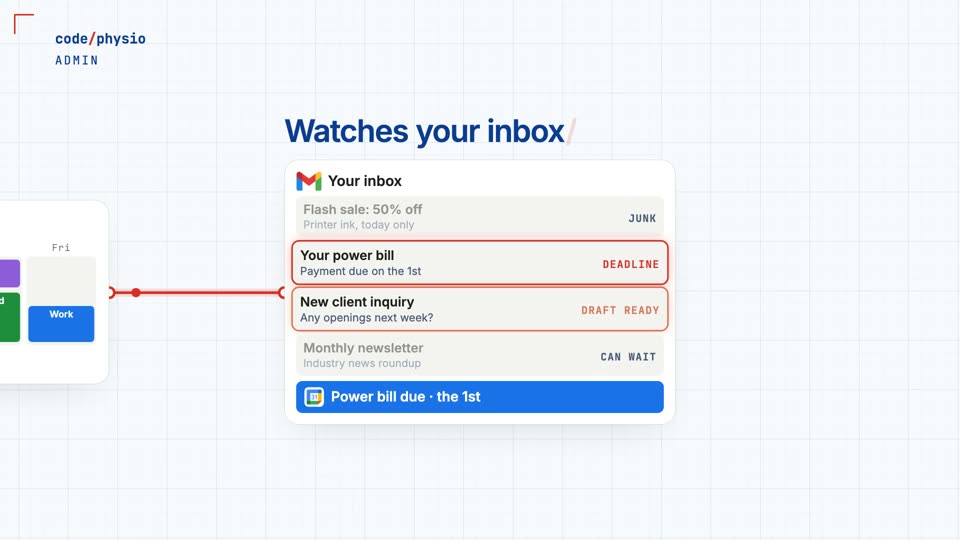
- It watches your inbox, drafts responses and catches deadlines.
- Meeting summaries update the team calendar and schedule reminders.
- Emailed and photographed receipts go into your bookkeeping software.




Time, money and revenue
Hourly rate based on the Nova Scotia median for medical receptionists, Job Bank Canada, 2023–24, plus about 20% payroll costs.
In a clinic
Client names are redacted in your synced calendar. Your Google events can block online booking in Jane, without Claude ever having access to your clinical software.
Included in
A major system. It counts as one of your 3 in Foundation or one of your 6 in Expanded, and it’s included in Full Stack.
Read what the video says
Claude connects to your Gmail, calendar, Google Drive, AI meeting note taker, bookkeeping software, and any other connectors you need. Your personal, work, and clinical schedules sync into one calendar, with client names redacted. It watches your inbox for important emails, drafts responses, and catches deadlines, like a power bill due on the first, and adds them to your calendar. Make a decision on a project, and it can add reminders or tasks, and file it in your knowledge vault, the memory of everything, with a build log of what you've completed, an ideas log, and folders for each topic. Your note taker summarizes important meetings, and Claude can update the team calendar and schedule reminders for everyone involved. New emailed receipts go straight into your bookkeeping software, and for a physical receipt, just add a photo to a folder it checks on a schedule. Rules and permissions can let it read and draft emails, but not send or delete them, so you decide how much to automate. You get a weekly plan based on your calendar, including your to-dos, upcoming events, planned content from the content engine, and your clinic schedule, updated with new bookings from your AI phone agent. And your Google events can block off time in Jane, so clients can't book online when you're busy, without Claude ever having access to your clinical software. It can save time and money, and prevent mistakes and bad client experiences, so you can take the stress off your mind. It works around the clock, trains quickly, and rarely repeats a mistake on simple scheduled tasks, at a fraction of the cost of another hire. So your admin person can focus on clients, or you can stay solo, without staffing challenges. Book a free consult, and see what this could do for your clinic.
Twenty minutes. One plan.
Bring the two jobs that eat your week. You’ll leave knowing which systems fit and what they cost.
Book a 20-minute call →Free. 20 minutes, no pitch deck, you leave with a plan either way.